My Personal Archive System
I shared a post on here previously about Jamie Todd Rubin's personal archive system (PAS). I have now started to implement my own. Doing this is something that's always interested me. I feel it's important to preserve details from your own life to look back on. It gives you good and bad memories to reflect on and you can build on these and live a more intentional life. My PAS differs from Jamie's in a few ways.
My PAS is centred on Obsidian. This is the central hub for everything. I use Dropbox for storage and link into Obsidian for things like PDFs, saved email etc. Dropbox provides a unique URL for each file. I then link it in Obsidian like so [descriptive filename](dropbox link).
I use Google Photos for photos and videos. I can then link into Obsidian using links again, using the same markdown URL method I mentioned above.
A key to linking in Obsidian is using descriptive filenames. This is essential for searching, as the actual document is not stored in Obsidian itself.
The choice to store documents externally for the most part is one based on speed. I want Obsidian to remain lightning fast even years down the line. If I bloat it with 100s of GB of documents this will slow it down and ruin the experience.
I want my archive to be available for me on all devices. For this I use Obsidian Sync. This is another reason for the external storage. Obsidian only provides 100GB of storage for their sync, so I don't ever want to run out.
My Obsidian setup is based around the daily note. I use a template for these.
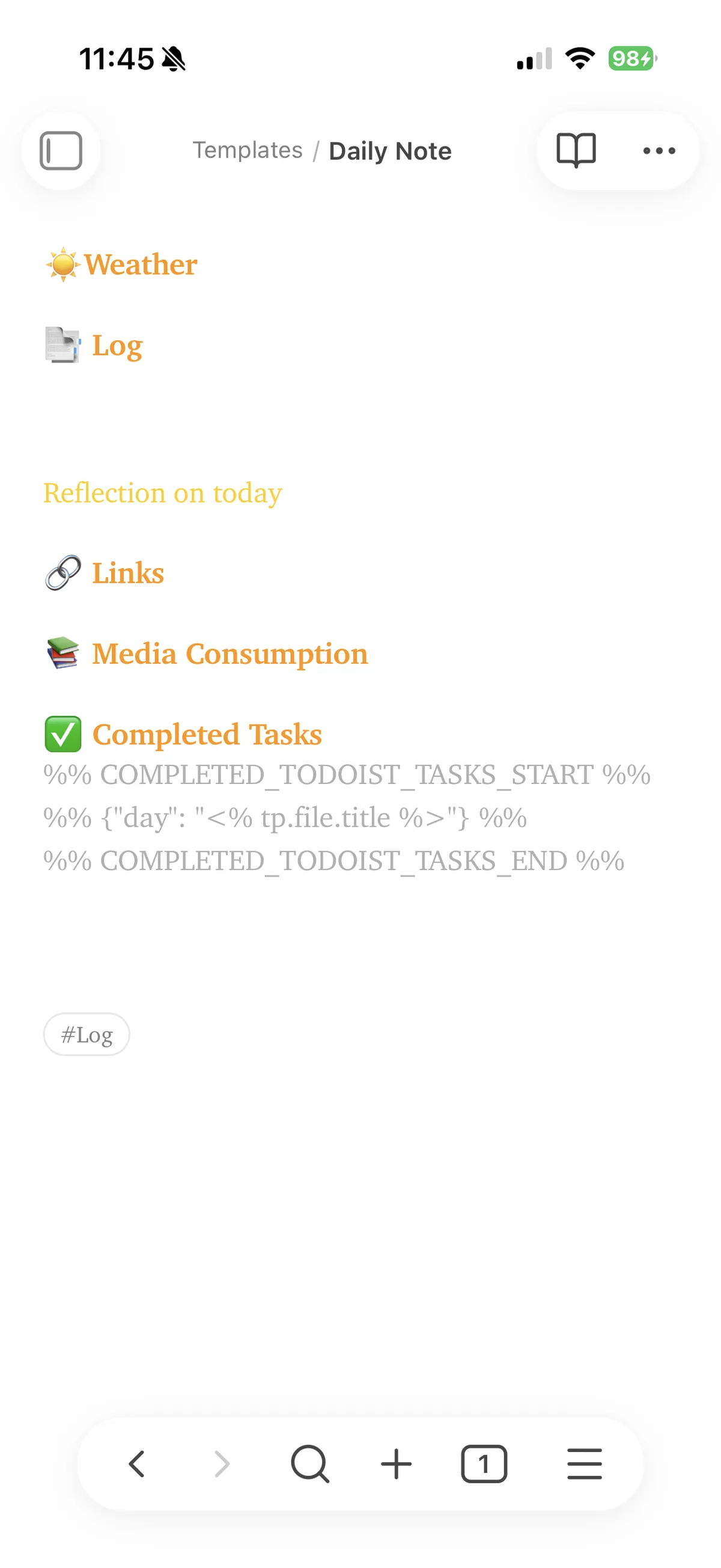
The daily note starts with a weather section. My grandad used to write in his diary the weather each day, just a line, and he said it helped him remember the day. So I have tried to do the same here. This causes me a few problems though. I'm based in Scotland, and we can have all the seasons in a day, which one to put - the snowstorm in the morning, the bright sunshine in the afternoon or the deluge in the evening? I did try and automate this but it was a bit much. I'm looking for other ways to automate this.
Next section is the log. This is where I log my day. What happened, who I spoke to, what I did - anything like that. This section can be fairly detailed or just a few lines depending on the day. This is the most important section for me. I also have a subheading in this section for reflections on the day. This part focuses less on what happened, and more about my thoughts on what happened.
After that comes the links section. Anything linked from Obsidian goes here. I also link other notes made on this day in this section.
Media Consumption is next. This is where I record what I've read for that day. I also use it to record any YouTube videos or podcasts that I've consumed that day. I might jot down a few notes here, or I might make a separate note and put the notes down there if I have more thoughts. I try and link to the article/video from this section too.
And the final section is Completed Tasks. I use Todoist to manage my tasks. I would really like a system where I could have all tasks added, completed and deleted appear in the Daily Note. Unfortunately, I can't find an easy, neat way of doing this. Therefore I settle for completed tasks. I use the plugin Todoist Completed Tasks to manage this. I do import all tasks created, deleted and completed in plain text into my weekly note.